
A. BigQuery for Data Analysts.
- Data Analyst role: derive data insights from queries and visualization. (Data analysis over R, Python)
- Data Engineer: design data processing systems. (Computer background)
- Data Scientist: analyze data and model systems using statistics and machine learning. (SQL, Python, Tensorflow, Keras)
-
CHALLENGES FOR DATA ANALYSTS:
- Query: too long and too complicated.
- Infrastructure: servers maintaining, scalability.
- Unaffordable Storage and lacking of a set of tools:
-
GC SOLUTIONS:
- Cheap storage: 20$/1TB (1000GB) in 2023. Unlike on-premises (local), Storage and Computing are decoupled on Google Cloud, hence you only pay for either storage or computing, pay only for what you use.
- Focus queries not infrastructure: serverless, no power, no maintenance
- Massive scalability: number of queries increases, number of CPUs is auto-scaled to run. (traditional: all CPUs (in server) always run no matter of the number of queries).
-
BIGQUERY:
- scales automatically
- only pay for bytes processed + storage.
-
TASKS OF DATA ANALYSTS:
- Ingest: Get petabytes of data in various formats: data volume. => BigQuery Storage
- Transform: cleaning: slow or quick processing => BigQuery analysis
- Store: manage datasets: storage cost, hard to scale => Cloud Storage (buckets), BigQuery Storage (tables)
- Analyze: derive data insights. => BigQuery analysis
- Visualize: explore and present the insights. => Looker, Looker Studio, 3rd parties.
-
4 WAYS TO INTERFACE WITH BIGQUERY:
- Web UI (directly)
- Console CLI (command line interface)
- Rest API
- GUI editors: Looker, Retool, PopSQL,..
-
BIGQUERY SPEED: ~ 1TB/s
B. Exploring and Preparing data with BigQuery.
-
PUBLIC DATASETS: includes flights, taxi cab logs, weather recordings, e-commerce
-
BASIC QUERY:
- BIGQUERY CHARGES PRICING:
- Note!: using “Preview” does not incure any COST.
- Query: charged by bytes processed.
- Load batch data: free (storing is separate cost)
- Load streaming data: charged
- Extract: free
-
Copy: free
- There is an estimated bytes on the TOP RIGHT at Bigquery UI.
- online Current bill of Bigquery
-
If you run a query twice, you will have a cache and no bill for cache. But cache is only existing for 24 hours. However, cache is charged when a destination table is selected and when you have “non-deterministic elements” (e.g. current_timestamp()) in your query.
- Note: we have 1TB per month of query processing at NO COST.
-
Lab: Exploring an Ecommerce Dataset using SQL in Google BigQuery:
- Task 1. Star the lab project in BigQuery
- Select “Star a project by name” to create a new project “data-to-insights”
- Task 2. Explore ecommerce data and identify duplicate records
- expand the project “data_to_insights” => ecommerce => “all_session_raw”
-
uses the SQL GROUP BY function on every field and counts (COUNT) where there are rows that have the same values across every field. If there is a row with the same values for all fields (duplicate), they will be grouped together and the COUNT will be greater than 1.
-
#standardSQL SELECT COUNT(*) as num_duplicate_rows, * FROM `data-to-insights.ecommerce.all_sessions_raw` GROUP BY fullVisitorId, channelGrouping, time, country, city, totalTransactionRevenue, transactions, timeOnSite, pageviews, sessionQualityDim, date, visitId, type, productRefundAmount, productQuantity, productPrice, productRevenue, productSKU, v2ProductName, v2ProductCategory, productVariant, currencyCode, itemQuantity, itemRevenue, transactionRevenue, transactionId, pageTitle, searchKeyword, pagePathLevel1, eCommerceAction_type, eCommerceAction_step, eCommerceAction_option HAVING num_duplicate_rows > 1; -
Note: even if you have a unique key, it is still beneficial to confirm the uniqueness of the rows with COUNT, GROUP BY, and HAVING before you begin your analysis.
- Analyze the new “all_sessions” table (de-duplicated table):
-
  #standardSQL
  # schema: https://support.google.com/analytics/answer/3437719?hl=en
  SELECT
  fullVisitorId, # the unique visitor ID
  visitId, # a visitor can have multiple visits
  date, # session date stored as string YYYYMMDD
  time, # time of the individual site hit  (can be 0 to many per visitor session)
  v2ProductName, # not unique since a product can have variants like Color
  productSKU, # unique for each product
  type, # a visitor can visit Pages and/or can trigger Events (even at the same time)
  eCommerceAction_type, # maps to ‘add to cart', ‘completed checkout'
  eCommerceAction_step,
  eCommerceAction_option,
  transactionRevenue, # revenue of the order
  transactionId, # unique identifier for revenue bearing transaction
  COUNT(*) as row_count
  FROM
  `data-to-insights.ecommerce.all_sessions`
  GROUP BY 1,2,3 ,4, 5, 6, 7, 8, 9, 10,11,12
  HAVING row_count > 1 # find duplicates
- Task 3. Write basic SQL on ecommerce data
- Write a query that shows total unique visitors
-
#standardSQL SELECT COUNT(*) AS product_views, COUNT(DISTINCT fullVisitorId) AS unique_visitors FROM `data-to-insights.ecommerce.all_sessions`; - Now write a query that shows total unique visitors(fullVisitorID) by the referring site (channelGrouping).
-
#standardSQL SELECT COUNT(DISTINCT fullVisitorId) AS unique_visitors, channelGrouping FROM `data-to-insights.ecommerce.all_sessions` GROUP BY channelGrouping ORDER BY channelGrouping DESC; - Write a query to list all the unique product names (v2ProductName) alphabetically:
-
#standardSQL SELECT (v2ProductName) AS ProductName FROM `data-to-insights.ecommerce.all_sessions` GROUP BY ProductName ORDER BY ProductName -
Note: “Which part of the previous query deduplicates the records?”
-
Write a query to list the five products with the most views (product_views) from all visitors (include people who have viewed the same product more than once). Your query counts number of times a product (v2ProductName) was viewed (product_views), puts the list in descending order, and lists the top 5 entries:
-
#standardSQL SELECT COUNT(*) AS product_views, (v2ProductName) AS ProductName FROM `data-to-insights.ecommerce.all_sessions` WHERE type = 'PAGE' #only check type Page GROUP BY v2ProductName ORDER BY product_views DESC LIMIT 5; - Bonus: Refine the query to no longer double-count product views for visitors who have viewed a product many times. Each distinct product view should only count once per visitor.
-
WITH unique_product_views_by_person AS ( -- find each unique product viewed by each visitor SELECT fullVisitorId, (v2ProductName) AS ProductName FROM `data-to-insights.ecommerce.all_sessions` WHERE type = 'PAGE' GROUP BY fullVisitorId, v2ProductName ) -- aggregate the top viewed products and sort them SELECT COUNT(*) AS unique_view_count, ProductName FROM unique_product_views_by_person GROUP BY ProductName ORDER BY unique_view_count DESC LIMIT 5 -
Note: Here we first create a query that finds each unique product per visitor and counts them once. Then the second query performs the aggregation across all visitors and products.
- Expand the previous query to include the total number of distinct products ordered and the total number of total units ordered (productQuantity):
-
#standardSQL SELECT COUNT(*) AS product_views, COUNT(productQuantity) AS orders, SUM(productQuantity) AS quantity_product_ordered, v2ProductName FROM `data-to-insights.ecommerce.all_sessions` WHERE type = 'PAGE' GROUP BY v2ProductName ORDER BY product_views DESC LIMIT 5; - Expand the query to include the average amount of product per order (total number of units ordered/total number of orders, or SUM(productQuantity)/COUNT(productQuantity)):
-
  #standardSQL
  SELECT
  COUNT(*) AS product_views,
  COUNT(productQuantity) AS orders,
  SUM(productQuantity) AS quantity_product_ordered,
  SUM(productQuantity) / COUNT(productQuantity) AS avg_per_order,
  (v2ProductName) AS ProductName
  FROM `data-to-insights.ecommerce.all_sessions`
  WHERE type = 'PAGE'
  GROUP BY v2ProductName
  ORDER BY product_views DESC
  LIMIT 5;
-
Task 4. Practice with SQL (challenges)
- Challenge 1: Calculate a conversion rate
-
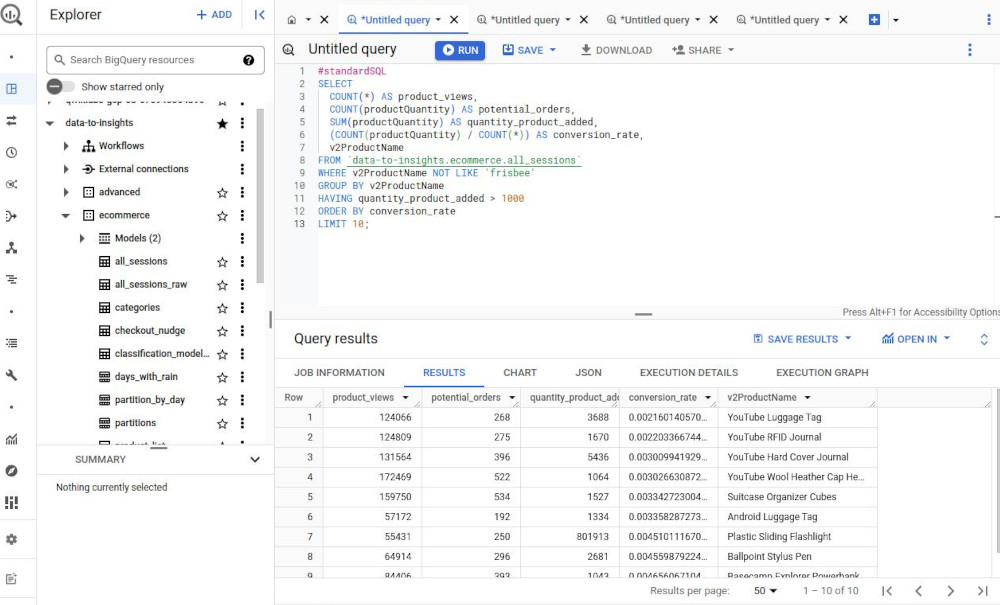
Write a “conversion rate” query for products with these qualities: More than 1000 units were added to a cart or ordered & are not “frisbees” product.
-
#standardSQL SELECT COUNT(*) AS product_views, COUNT(productQuantity) AS potential_orders, SUM(productQuantity) AS quantity_product_added, (COUNT(productQuantity) / COUNT(*)) AS conversion_rate, v2ProductName FROM `data-to-insights.ecommerce.all_sessions` WHERE LOWER(v2ProductName) NOT LIKE '%frisbee%' GROUP BY v2ProductName HAVING quantity_product_added > 1000 ORDER BY conversion_rate DESC LIMIT 10; -
- Challenge 2: Track visitor checkout progress
-
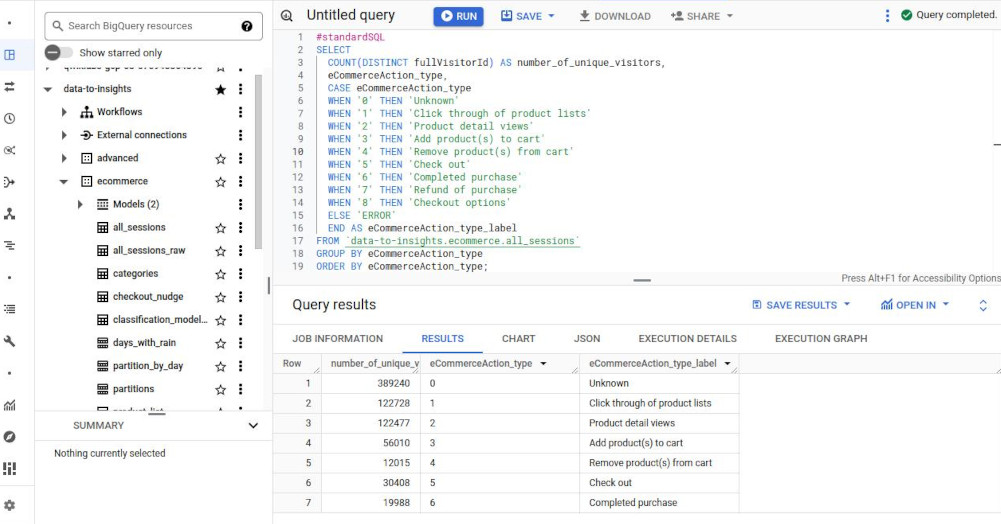
Write a query that shows the eCommerceAction_type and the distinct count of fullVisitorId associated with each type.
-
#standardSQL SELECT COUNT(DISTINCT fullVisitorId) AS number_of_unique_visitors, eCommerceAction_type, CASE eCommerceAction_type WHEN '0' THEN 'Unknown' WHEN '1' THEN 'Click through of product lists' WHEN '2' THEN 'Product detail views' WHEN '3' THEN 'Add product(s) to cart' WHEN '4' THEN 'Remove product(s) from cart' WHEN '5' THEN 'Check out' WHEN '6' THEN 'Completed purchase' WHEN '7' THEN 'Refund of purchase' WHEN '8' THEN 'Checkout options' ELSE 'ERROR' END AS eCommerceAction_type_label FROM `data-to-insights.ecommerce.all_sessions` GROUP BY eCommerceAction_type ORDER BY eCommerceAction_type; -
- Challenge 3: Track abandoned carts from high quality sessions
-
Write a query using aggregation functions that returns the unique session IDs of those visitors who have added a product to their cart but never completed checkout (abandoned their shopping cart).
-
#standardSQL # high quality abandoned carts SELECT #unique_session_id CONCAT(fullVisitorId,CAST(visitId AS STRING)) AS unique_session_id, sessionQualityDim, SUM(productRevenue) AS transaction_revenue, MAX(eCommerceAction_type) AS checkout_progress FROM `data-to-insights.ecommerce.all_sessions` WHERE sessionQualityDim > 60 # high quality session GROUP BY unique_session_id, sessionQualityDim HAVING checkout_progress = '3' # 3 = added to cart AND (transaction_revenue = 0 OR transaction_revenue IS NULL) 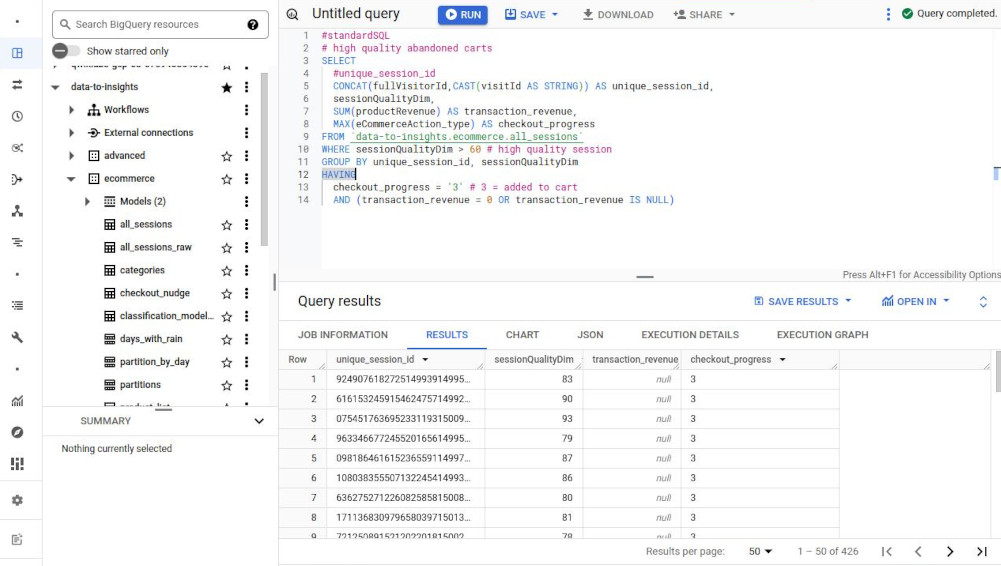
- Task 1. Star the lab project in BigQuery
-
Working with functions:
- String functions: parsing string values:
- CONCAT(“12”, “34”) => “1234”
- ENDS_WITH(“Apple”, “e”) => true
- LOWER(“BigA”) => biga
- REGEXP_CONTAINS(“Lunchbox”, r”^*box$”) => true
- Special regex: matching for a string like “shirt” anywhere in a string:
- WHERE LOWER(v2ProductName) LIKE ‘%shirt%’ LIMIT 100;
- Aggregation functions:
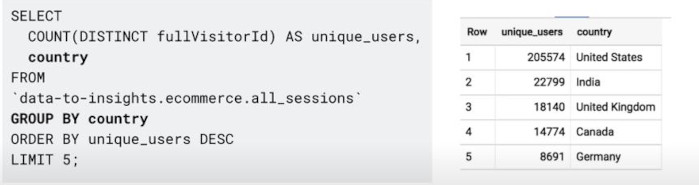
- COUNT(DISTINCT fullVisitorId) AS unique_users
- Note: Any non-aggregated fields must be in “GROUP BY”
-
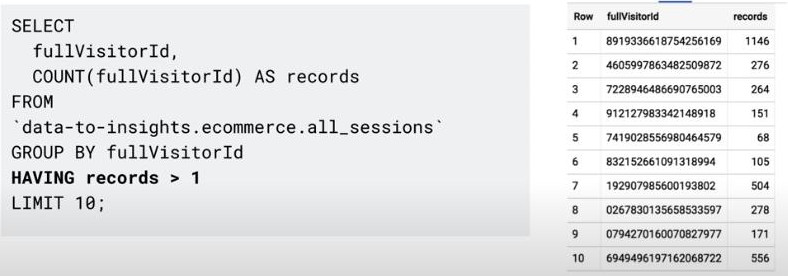
- Tip to filter duplicate with COUNT, GROUP BY and HAVING: (“HAVING” works for an aggregation.)
-
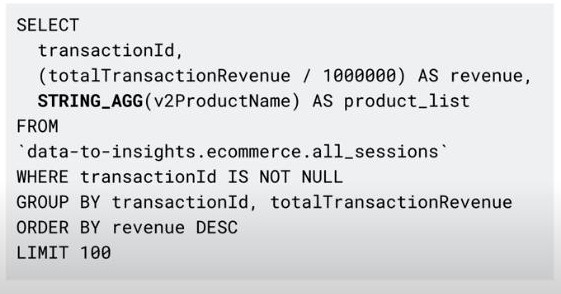
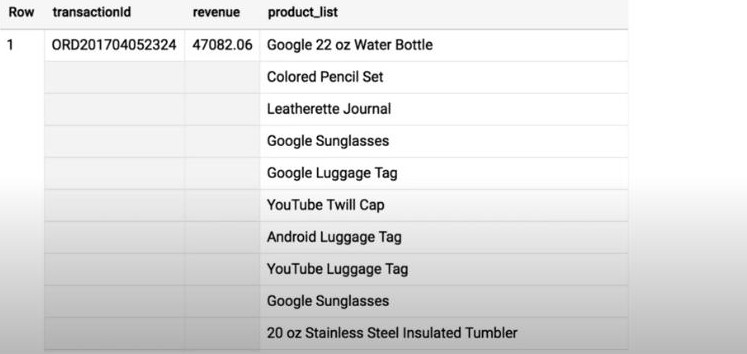
- STRING_AGG(productName): it’s useful when all columns are the same except one, so we just aggregate this single column.
-
-
Limit aggregation is possible: STRING_AGG(productName LIMIT 3)
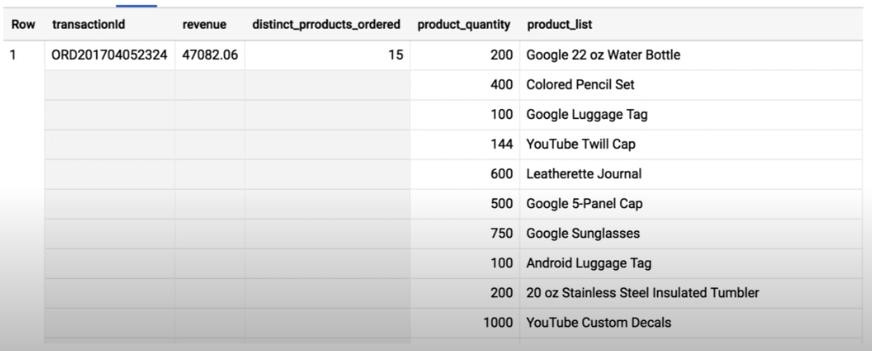
- ARRAY_AGG(productName): similar to STRING_AGG but more easy to read because it auto breaking to create a new line, one product per line. It’s very useful when we have a quantity for each product.
- Data type conversion: CAST()
- CAST(“123” AS INT64) => 123
- CAST(“2017-08-01” AS DATE) => 2017-08-01
- CAST(111222333 AS STRING) => “111222333”
- SAFE_CAST(“apple” AS INT64) => NULL (throw err with CAST)
- NULL: what is a “NULL”?
- NULL cannot be compared to a NULL,
- NULL means empty,
- NULL is not an blank string “”,
- NULL is not equal to anything.
- then, how to filter records not NULL: WHERE transactionId IS NOT NULL
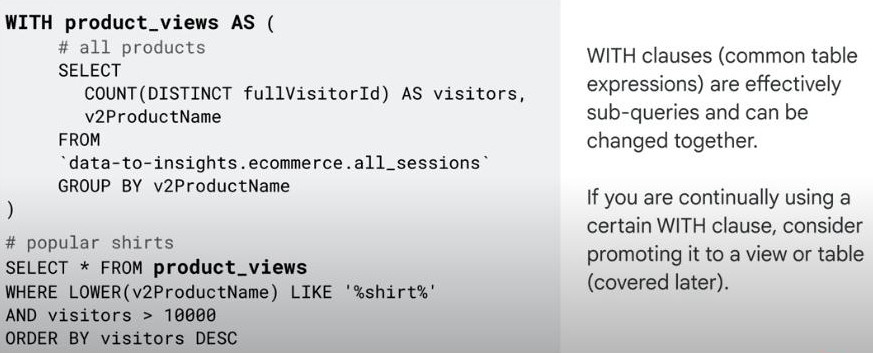
- WITH clause: to create a sub-queries or separate sub-table with a name.
-
Statistical functions
-
Analytic functions
- User-defined functions
- String functions: parsing string values:
-
Lab: Troubleshooting Common SQL Errors with BigQuery
- Task 1. Pin a project to the BigQuery resource tree
- “Add” => “Start a project by name” => new dataset “data-to-insights”
-
Task 2. Find the total number of customers who went through checkout
-
Task 3. List the cities with the most transactions with your ecommerce site
- Task 4. Find the total number of products in each product category
- Task 1. Pin a project to the BigQuery resource tree
-
Enrich with UNIONS & JOIN:
-
UNION DISTINCT: vertically merge data => same columns. (notice: the number of columns and their datatypes must match respectively).
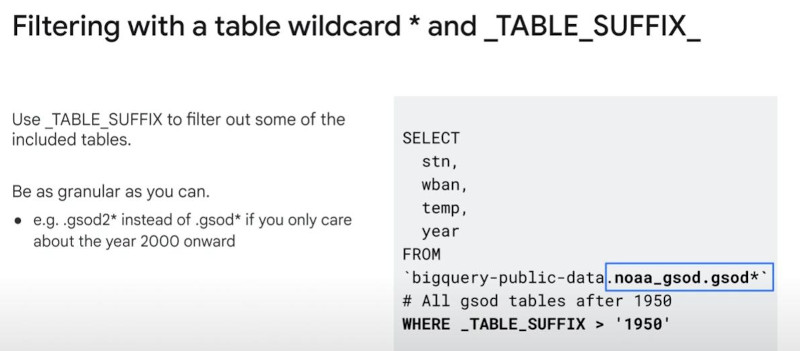
- UNION more easy with “table wildcard” and _TABLE_SUFFIX
-
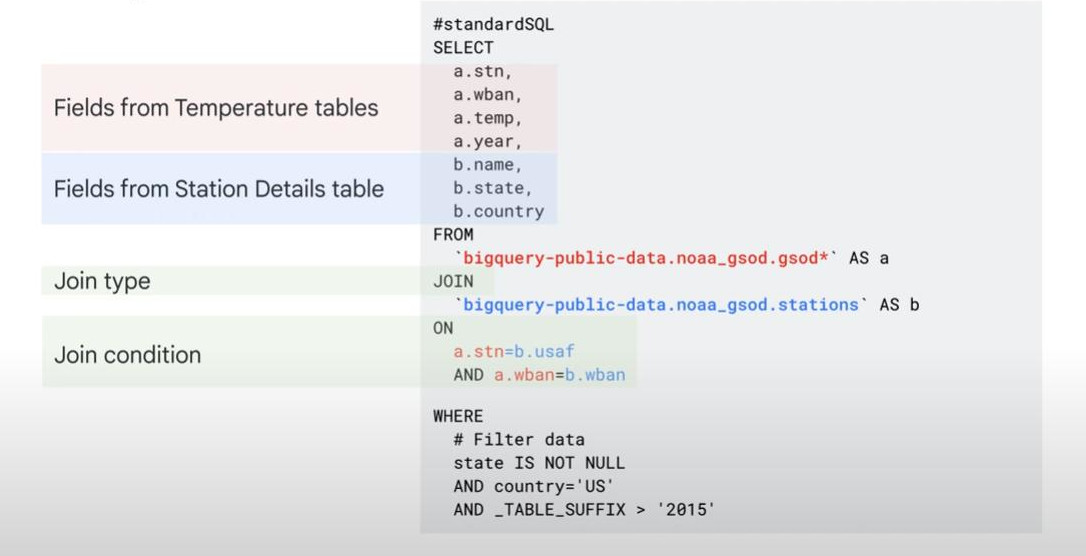
- JOIN requires an identical field/col to combine horizontally.
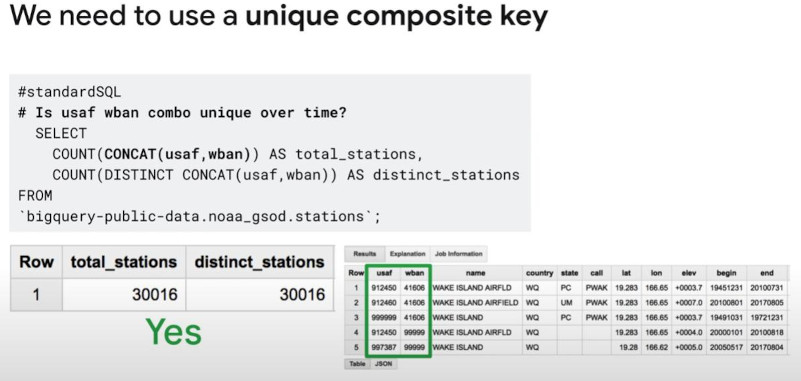
- Hint: sometimes “unique” only have by CONCAT(col1, col2)
-
-
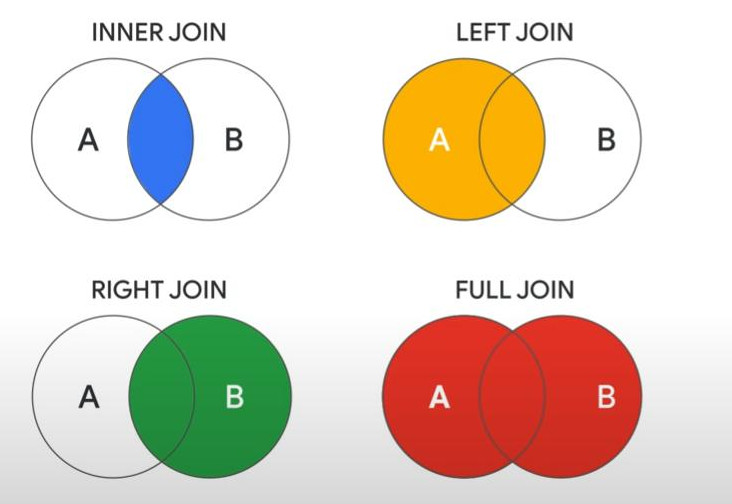
- INNER JOIN (default), LEFT JOIN, RIGHT JOIN, FULL JOIN:
-
-
Note: the join key is unique only on one-side of the join.
- Warning: join can explode your data and bill if unique keys are not unique.
-
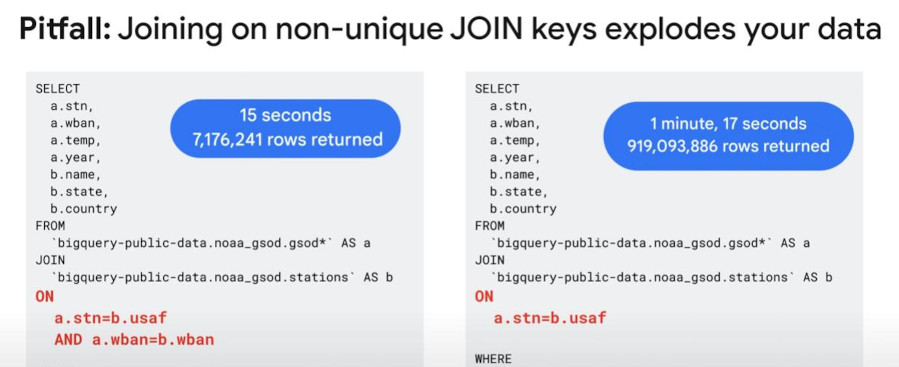
- So, always consider using multi-join-conditions OR use CONCAT() to create “unique composite key” if there’s no unique fields existing.
-
-
Lab: Troubleshooting and Solving Data Join Pitfalls
-
Task 1. Create a new dataset to store your tables
- Task 2. Pin the lab project in BigQuery
- Scenario: Your team provides you with a new dataset “data-to-insights” on the inventory stock levels for each of your products for sale on your ecommerce website. BigQuery public datasets are not displayed by default. To open the public datasets project, Click + Add > Star a project by name then paste the “data-to-insights” name.
-
Task 3. Examine the fields
- Task 4. Identify a key field in your ecommerce dataset
- Find how many “product names” and “product SKUs” are on the website
-
#standardSQL # how many products are on the website? SELECT DISTINCT productSKU, v2ProductName FROM `data-to-insights.ecommerce.all_sessions_raw` -
The above sql will have more rows than the below sql, because it is a “composite field” or a distinct couple of columns, not “distinct single column”.
-
  #standardSQL
  SELECT DISTINCT
  productSKU
  FROM `data-to-insights.ecommerce.all_sessions_raw`
- Task 5. Pitfall: non-unique key => join can explode data volume.
- Oh no! It is 154 x 3 = 462 or triple counting the inventory! This is called an “unintentional cross join”
- Task 6. Join pitfall solution: use distinct SKUs before joining.
- Join pitfall: losing data records after a join
-
Join pitfall solution: selecting the correct join type and filtering for NULL
- Join pitfall: unintentional cross join
- Note: For a CROSS JOIN, there is no join condition (e.g. ON or USING). The field is simply multiplied against the first dataset or .05 discount across all items.
-
3. Cleaning and Transforming data.
4. Ingesting and Storing new Datasets.
5. Visulizing your Insights with BigQuery.
6. Developing Scalable Data Transformation Pipelines in BigQuery with Dataform.
7. BigQuery Studio.