
CUDA is a platform developed in 2006 by NVIDIA that enables dramatic increases in parallel computing performance by harnessing the power of the GPU.
Real challenge : CUDA allows developers to develop applications that transparently scales its parallelism to leverage the increasing number of processor cores in GPUs.
This article is based on resource of Nvidia.
Programming languages used in this article is C++.
- NEW CONCEPTS:
- indexing : before reading more, all we need to remember that in CUDA programming, indexing is handled automatically by device/GPU.
- CPU (central processing unit) : CPU is designed to excel at executing a sequence of operations, called a thread, as fast as possible and can execute a few tens of these threads in parallel
-
GPU (graphics processing unit, device) : designed to excel at executing thousands of threads in parallel. It is devoted to data processing rather than data caching and flow control.
- GPU generations: each has different architecture: Kepler, Pascal, Volta, Ampere, Ada architectures.
- Thread : a 3-component vector but by analogy, it is also seen as a single “worker”.
- SM : A GPU is built around an array of Streaming Multiprocessors (SMs). the rule is more SMs more powerful GPU.
-
Warp : phycical part in a GPU that contains 32 threads inside a SM. (physical means not relevant to CUDA definition).
- SM version : stand for the compute capability or architecture, comprise 2 numbers X.Y:
- Major revision number X: 6-Pascal architecture, 7-Volta, 8-Ampere, 9-Hopper.
- Minor revision number Y: denote a new feature only, not architecture.
- Note: SM version is not CUDA version.
- Compute capability : different and based on GPU generation/architecture.
- compute capability 5.0 → sm_50 → Maxwell (GM10x)
- compute capability 6.0 → sm_60 → Pascal (GP100)
- compute capability 7.5 → sm_75 → Turing (TU10x)
- compute capability 8.6 → sm_86 → Ampere (GA10x)
- compute capability 9.0 → sm_90 → Ada Lovelace (AD10x)
- Block of threads : currently, a block may contain up to 1024 threads (or workers). It can be one-dimensional, two-dimensional, or three-dimensional.
- Kernel : is CUDA C++ function that, when called, are executed N times in parallel by N different threads, as opposed to only once like regular C++ functions.
- Grid : Blocks are organized into a one-dimensional, two-dimensional, or three-dimensional grid.
- Cluster : also organized into a one-dimension, two-dimension, or three-dimension grid of thread block, meaning one grid can have many clusters, each of which can have many blocks.
-
Why? : First, blocks cannot synchronize by default, but blocks defined in a cluster can synchronize or communicate via shared memory. This allows more cooperative parallelism across multiple SMs.
-
-
MEMORY HIERARCHY (fastest to slowest):
-
Stt Type Location Description 1 Registers just a few KBs the 1st fast, private on each thread/worker 2 Local memory belongs to a thread or worker but on global memory the 2nd fast 3 Shared memory/L1 cache onchip, 50-150 KBs memory of a block that is shared among threads in that block with same lifetime of the block, declared by __shared__keyword.4 Distributed Shared Memory (new since Hopper/Ada SM) onchip, the same to L1 memory of a cluster that is shared among threads in the cluster/(blocks of that cluster) with the same lifetime of the cluster.
CommandsCUDA_CHECK(::cudaFuncSetAttribute())can make DSM bigger as taking temporarily space from L1 memory.5 L2 memory onGPU will have one L2 memory, few MBs Shared automatically across all SMs in the GPU; you can influence with APIs like cudaDeviceSetLimit(cudaLimitPersistingL2CacheSize). Its lifetime is until evicted/expelled. 6 Global memory (offchip, onGPU=onBoard=VRAM), GBs shared between kernels in one single app, handled by cudaMalloc(). Keyword for variables is __device__and for kernels is__global__.7 Constant memory (offchip, onGPU) : for read-only data broadcast efficiently/shared to all GPU threads. Keyword is __constant__8 Texture memory (offchip, onGPU) : Specialized read-only cached memory for 2D/3D spatial access. not for AI => ingnore. 9 Unified Memory (onVRAM) : slowest, managed by CUDA, auto_shared between GPU and CPU, declared with __managed__keyword, registered by command cudaMallocManaged(&ptr, size * sizeof(float));
-
- host : refers to CPU
-
device : refers to GPU
- size_t : a size of bytes results from “sizeof()”. Ex: size_t s = 5*sizeof(float);
-
stream : data transfers between host and device is called stream in this topic, particularly, one stream example is
cudaMemcpyAsync(d_data, h_data, size, cudaMemcpyHostToDevice,stream1); - Engine: since Volta architecture,
engineconcepts came, a hardware unit executing aspecific kind of task. Previously, all engines shared single global domain, it limits concurrency because synchornization is always required across all engines. Now, with domains, engines are divided into independent domains. We have many types of engines with different roles:-
Engine Type Function Example Work Compute Engine Runs CUDA kernels on SMs matrix multiply, convolutions Copy (DMA) Engine Moves data between memory regions
(GPU↔CPU, GPU↔GPU)cudaMemcpyAsync()Decode/Encode Engine Handles video (NVDEC/NVENC) H.264 decoding Optical Flow Engine Computes optical flow fields Optical flow in DL/graphics RT (Ray Tracing) Engine Specialized for ray intersection Ray tracing Tensor Engine Executes tensor core operations inside SMs AI matrix ops
-
- SYNTAXES :
__global__: stands for a CUDA kernel in C++.<<<...>>>: indicates a grid configuration on device, the total number of CUDA threads that execute a CUDA kernel, in a form :FuncName<<<numBlocks, threadsPerBlock>>>(args...).- int : one-dimentional datatypes for “numBlocks” or “threadsPerBlock”.
-
dim3 : 3-dimentional datatypes for “numBlocks” or “threadsPerBlock”.
-
Thread index and thread ID : they are relate to each other in a straightforward way: For a one-dimensional block, they are the same; for a two-dimensional block of size (Dx, Dy), the thread ID of a thread of index (x, y) is (x + y Dx); for a three-dimensional block of size (Dx, Dy, Dz), the thread ID of a thread of index (x, y, z) is (x + y Dx + z Dx Dy). All of this indexing is auto-defined in CUDA.
-
```
  // Kernel definition
  __global__ void MatAdd(float A[N][N], float B[N][N],
  float C[N][N])
  {
      // blockDim.x = number of threads at a block on X axis.
      int i = blockIdx.x * blockDim.x + threadIdx.x;
      int j = blockIdx.y * blockDim.y + threadIdx.y;
      if (i < N && j < N)
          C[i][j] = A[i][j] + B[i][j];
  }

  int main()
  {
      ...
      // Kernel invocation
      dim3 threadsPerBlock(16, 16);
      dim3 numBlocks(N / threadsPerBlock.x, N / threadsPerBlock.y);
      MatAdd<<<numBlocks, threadsPerBlock>>>(A, B, C);
      ...
  }

  ```
</pre>
-
__syncthreads() :acts as a barrier at which all threads in the block must wait before any is allowed to proceed. They share data through some “shared memory”. __cluster_dims__(X,Y,Z) :: define cluster size (numBlocks), which cannot be modified when launching the kernel, so that the syntax Func«<numBlocks, threadsPerBlock»> can be used as normal.-
```
  // Compile time cluster size 2 blocks in X-dimension and 1 in Y and Z dimension
  __cluster_dims__(2, 1, 1) __global__ void cluster_kernel(float *input, float* output)
  ```
-
- cudaLaunchKernelEx() : used to set cluster-size at runtime if it is not set yet in compile time.
-
```
  // Kernel invocation with runtime cluster size
  {
      cudaLaunchConfig_t config = {0};
      // The grid dimension is not affected by cluster launch, and is still enumerated
      // using number of blocks.
      // The grid dimension should be a multiple of cluster size.
      config.gridDim = numBlocks;
      config.blockDim = threadsPerBlock;

      cudaLaunchAttribute attribute[1];  //means 1 attribute
      attribute[0].id = cudaLaunchAttributeClusterDimension;
      attribute[0].val.clusterDim.x = 2; // Cluster size in X-dimension
      attribute[0].val.clusterDim.y = 1;
      attribute[0].val.clusterDim.z = 1;
      config.attrs = attribute;
      config.numAttrs = 1;

      cudaLaunchKernelEx(&config, cluster_kernel, input, output);
  }
  ```
-
- num_threads() and num_blocks() API : for calling cluster size
-
dim_threads() and dim_blocks() API : for calling the dimention rank of a thread or block in a cluster.
-
__block_size__: alternative way to define a cluster size more specifically with number of threads each blockDim. Its presence will lead to a change in<<<...>>>which now only accept 1 arguments “the number of clusters” in the grid.-
 ```
  // 1st arg: (1024, 1, 1) is number of threads at each blockDim
  // 2nd arg: (2, 2, 2) is cluster-size, numBlocks in a cluster
  __block_size__((1024, 1, 1), (2, 2, 2)) __global__ void foo();

  ...
  // number of clusters are 8x8x8 => 8 clusters in X, 8 in Y, 8 in Z-dim
  foo<<<dim3(8, 8, 8)>>>();
  ```
-
- PROGRAMMING INTERFACE:
- NVCC compiler: kernel can be written by PTX or C++, both must be compiled into binary code with by NVCC.
- Code types: 2 types, “device code” tha runs on GPU and host code run by CPU.
__global__ void VecAdd() {...}: device codeint main(){...}: host code
- Compilation workflow and offline compiler nvcc:
- Compiler vs Assembler:
- Compiler (gcc, nvcc, nvrtc): translates high-level source (C/C++) → intermediate or assembly code.
- Assembler (ptxas): translates assembly code → machine binary or binary code.
- Different format types from compilation:
-
PTX : intermediate GPU code, a text file that is readable, output from nvcc compilation, PTX can be assembled by ptxas to any specific CUBIN or SASS. PTX is portable because it can run on different generations of GPU, old or new GPUs.
-
CUBIN : Cuda Binary : final GPU machine code, not human-readable, output from nvcc compilation or PTX assembly, a collection of one or more SASS codes. It can run only one generation of GPU.
- .fatbin : fat binary code, a type of format that usually include PTX and/or CUBIN code. Fatbin files are often embeded into host binary code.
- SASS : binary code with many types, each is fit only for one SM architecture (Ex: SM_70, SM_80 denote Volta or Ampere architecture respectively)
-
- in sequence:
- [Step 1] nvcc compiles device code → produces PTX and/or CUBIN (SASS) → combine them in a .fatbin (GPU code)
- [Step 2] nvcc compiles host code → produces .o (CPU code)
- [Step 3] nvcc embeds the .fatbin into the host .o
- [Step 4] Linker (nvlink) that combines all .o files → final executable
- Compiler vs Assembler:
- Just-In-Time Compilation : is “nvrtc compiler” runs at run-time, it is different from nvcc (offline). It compile whenever a NEW application/game is run, then caches to avoid repeating as re-openning.
- Device driver : a runtime manager that control almost both soft and hard-ware in the VGA card.
- JIT compiler : is a compiler of a device driver.
JIT compiler = PTX compiler + CUBIN assembler + optimizer
- Shader : is a small GPU program written in languages like HLSL (DirectX), GLSL (OpenGL), or SPIR-V (Vulkan) that is compiled and cached by JIT compilation for the first time.
- Binary Compability:
- “nvcc k.cu -gencode -code=sm_80” : output is CUBIN/SASS that only run on devices with compute capacity 8.0 or higher.
- Tegra : developerd by Nvidia that includes both CPU and GPU but it is not a desktop. Tegra is used in AI car, nvidia TV, Nintendo. Binary compability is not the same between desktop and tegra.
- PTX Compability:
- PTX is only compiled/run with targeted/higher compute capacity.
- “nvcc k.cu -gencode -arch=compute_50” : output is PTX that require equal or higher compute capacity 5.0. Additionally, it should be the same architecture family.
- “nvcc -gencode arch=compute_75,code=sm_75”: help generate multiple-version PTX/CUBIN just by one command like below:
-
```
  nvcc mykernel.cu \
      -gencode arch=compute_75,code=sm_75 \
      -gencode arch=compute_80,code=sm_80 \
      -gencode arch=compute_86,code=sm_86
  ```
-
- What if we dont have -arch,-code, nvcc will use default target compute capacity/architecture of CUDA version:
- CUDA 12.x -> sm_52
- CUDA 13.x -> sm_60
- DEVICE MEMORY: can be either arrays or linear memory (linkedlist or binary tree)
- During kernels opertation is HETEROGEOUS because data can be transfered between “host memory” and “device memory” at runtime.
- Syntaxes on Device/GPU:
- cudaMalloc() : allocate a device memory address/space.
-
```
  // allocates a block of device memory
  // then assigns it to a device pointer "d_a".
  cudaMalloc(&d_a, 5 * sizeof(int))
  ```
-
- cudaFree() : free allocated memory/space.
- cudaMemcpy() : a TRUE copy to replicate data between host and device memory. the rule to remember is “Destination first”
-
  // host to device pointer d_a.
  cudaMemcpy(d_a, h_a, 5 * sizeof(int), cudaMemcpyHostToDevice)

  // device to host pointer h_c.
  cudaMemcpy(h_c, d_c, 5 * sizeof(int), cudaMemcpyDeviceToHost)

  // single float, host var requires ampersand "&".
  cudaMemcpy(deviceValue, &hostValue, sizeof(float),cudaMemcpyHostToDevice);
-
- cudaMalloc() : allocate a device memory address/space.
- Syntaxes on host/CPU:
-
  // in C
  float* h_A = (float*)malloc(5*sizeof(float)); ...; free(h_A);
  // in C++
  float* h_A = new float[5]; ...; delete[] h_A;
-
- 2D arrays: cudaMallocPitch() for allocation, calculate “pitch”
- What and Why padding?:
- For coalesced memory access, CUDA sometimes needs each row of a 2D array to start at an address aligned to a certain boundary (64 or 128 bytes). So, CUDA may pad (đệm) each row with extra unused bytes (padding) to maintain this alignment.
- pitch : the number of bytes from the start of ONE ROW to the start of the
next row. it may be larger than width * sizeof(float) due to padding size.
-
pitch = arrayWidth * sizeof(float) + padding_size
-
-
  // Host code
  int width = 64, height = 64;
  float* devPtr;
  size_t pitch;

  // Device memory allocation, calculate "pitch".
  cudaMallocPitch(&devPtr, &pitch, width * sizeof(float), height);
  MyKernel<<<100, 512>>>(devPtr, pitch, width, height);

  // Device code
  __global__ void MyKernel(float* devPtr, size_t pitch,
                              int width, int height)
  {
      for (int r = 0; r < height; ++r) {

          // char* points to either 1 character or 1 byte.
          // char* is to convert devPtr to byte because pitch is bytes.
          float* row = (float*)((char*)devPtr + r * pitch);

          for (int c = 0; c < width; ++c) {
              float element = row[c];

              ... computing with element ...
              ... return result back to devPtr ...
          }
      }
  }
- What and Why padding?:
- 3D arrays:
- cudaPitchedPtr: is a struct type of CUDA, this cudaPitchedPtr will be filled by cudaMalloc3D().
-
  struct cudaPitchedPtr {
      void*  ptr;    // Pointer to the first byte of the allocated memory
      size_t pitch;  // Width in bytes of each 2D slice row.
      size_t xsize;  // Logical width in bytes (usually width * sizeof(T))
      size_t ysize;  // Logical height (number of rows)
  };
-
-
  // Host code
  int width = 64, height = 64, depth = 64;

  // the width, height, and depth in bytes, rows, and slices, respectively.
  cudaExtent extent = make_cudaExtent(width * sizeof(float),
                                      height, depth);

  // store metadata about your pitched 3D memory
  cudaPitchedPtr devPitchedPtr;
  cudaMalloc3D(&devPitchedPtr, extent);

  MyKernel<<<100, 512>>>(devPitchedPtr, width, height, depth);

  // Device code
  __global__ void MyKernel(cudaPitchedPtr devPitchedPtr,
                          int width, int height, int depth)
  {
      char* devPtr = devPitchedPtr.ptr;
      size_t pitch = devPitchedPtr.pitch;
      size_t slicePitch = pitch * height;

      for (int z = 0; z < depth; ++z) {
          // moving slice by slice
          char* slice = devPtr + z * slicePitch;

          for (int y = 0; y < height; ++y) {
              // along height
              float* row = (float*)(slice + y * pitch);

              for (int x = 0; x < width; ++x) {
                  // along row/width
                  // notice: element starts at devPtr at [0,0,0].
                  float element = row[x];
              }
          }
      }
  }
- cudaPitchedPtr: is a struct type of CUDA, this cudaPitchedPtr will be filled by cudaMalloc3D().
-
Allocation Failure (Out of memory) : If the allocation fails because of lack of memory, we can fallback to slower HOST memory types using
cudaMallocHost()orcudaHostRegister(). It’s calledPage-locked Host memorytech that is mentioned later. - cudaMemcpyToSymbol() and cudaMemcpyFromSymbol(): transfer data from/into a symbol on device.
- What “symbol”? : “symbol” refers to the variables are declared only by 2 ways:
__constant__ hoặc __device__:__constant__ A: A is a read-only global symbol. (global: both host and device can read.)__device__ B: A is a read/write global symbol.
-
  // on device code
  __constant__ float constData[256];

  // on host code
  float data[256];
  cudaMemcpyToSymbol(constData, data, sizeof(data));
  cudaMemcpyFromSymbol(data, constData, sizeof(data));

  // on device code
  __device__ float devData;

  // on host code
  float value = 3.14f;
  cudaMemcpyToSymbol(devData, &value, sizeof(float));

  // on device code
  __device__ float* devPointer;

  // on host code
  float* ptr;
  cudaMalloc(&ptr, 256 * sizeof(float));
  cudaMemcpyToSymbol(devPointer, &ptr, sizeof(ptr));

  // Note: for HOST variable/arr, cudaMemcpyToSymbol or
  // cudaMemcpyFromSymbol() need "&" before host_variable (but not host_arr).
- What “symbol”? : “symbol” refers to the variables are declared only by 2 ways:
-
Question: how to take address of a pointer “ptr”, answere: (void**)&ptr
- cudaGetSymbolAddress() : it’s not a TRUE copy, just a reference to a symbol address on device, then we can use it in cudaMemcpy() or insert into another func.
-
  __device__ float d_arr[256];

  int main() {
      float* h_ptr = nullptr;

      // Get address of devArray
      // very similar to normal C++ : int x; int* ptr = &x;
      // OR for array: int arr[10]; int* ptr = arr; (ptr = &x[0];)
      cudaGetSymbolAddress((void**)&h_ptr, d_arr);

      // Now we can use cudaMemcpy() directly
      // creating a data on host with "hostData[256]", then copy to device.
      cudaMemcpy(h_ptr, hostData, sizeof(hostData), cudaMemcpyHostToDevice);

      return 0;
  }
-
- cudaGetSymbolSize() :
      __device__ float d_arr[256];

      int main() {
          size_t size = 0;   // size in bytes
          cudaGetSymbolSize(&size, d_arr);

          printf("Size of devArray on device: %zu bytes\n", size);
          return 0;
      }
- L2 Memory/Cache Management:
- What L2 memory?: L2 cache is a shared, high-speed memory that sits between the GPU cores (SMs) and the main GPU memory (VRAM/global memory).
- What L2?: larger but slower than L1 cache inside each SM.
- Why L2 cache: shared by all SMs (streaming multiprocessors) on the GPU.
- streaming (access): denote the global memory/data accesses, happening only once or twice.
-
persisting (access): denote the global memory/data accesses, happening frequently. It needs special care, so from CUDA 11.0+, device with compute capacity 8.0+ allows users to influence L2 caching
- Size : we can set how large L2 for our kernel with cudaDeviceSetLimit()
- Customization: we can also allocate which attribute on L2 cache. For ex: every time you stream new inputs through, L2 cache evicts those reused weight matrix. There are 2 different APIs with different scope:
- cudaStreamSetAttribute(): influence a stream only
- What stream? : a sequence/queue of commands we define, we can have many streams that run in parallel on devices. Stream is not thread, one stream can run multi-thread.
-
  cudaStream_t stream1, stream2;
  cudaStreamCreate(&stream1);
  cudaStreamCreate(&stream2);

  KernelA<<<grid, block, 0, stream1>>>(); // one kernel
  KernelB<<<grid, block, 0, stream2>>>(); // one kernel
- cudaGraphKernelNodeSetAttribute(): influence a node in a graph or DAG, not all the graph.
- what graph? : a stream can be seen like a straight graph/DAG, a graph often includes many nodes (kernels). We can have many streams but often need only one graph/DAG.
-
  cudaGraph_t graph;
  cudaGraphCreate(&graph, 0);

  cudaGraphNode_t nodeA, nodeB;
  cudaKernelNodeParams A_params = {...};
  cudaKernelNodeParams B_params = {...};

  // add nodes into the graph
  cudaGraphAddKernelNode(&nodeA, graph, nullptr, 0, &A_params);
  cudaGraphAddKernelNode(&nodeB, graph, &nodeA, 1, &B_params);
- hitRatio: the fraction of the L2 cache memory (set apart for persisting) a stream/node can use. On other hands, how much of that stream’s L2 “window” is expected to remain cached persistently.
- Lower hitRation: less L2 memory for caching.
- Unvoidable Confliction : concurrent streams can compete as sum of hitRation > 1, L2 will be auto-shared between them.
- What thrashing? : streams compete each other to cache.
Assume: The GPU L2 set-aside cache = 16 KB (reserved for persistence) Two streams, streamA and streamB Each stream has a 16 KB access policy window Both set hitRatio = 1.0 Then, both streams are competing for the same 16 KB of cache. Each assumes it can keep all 16 KB of its data in L2 persistently — but in reality, only one can fully stay. So they’ll evict each other’s lines, causing thrashing. => both streams should set hitRatio = 0.5 -
Situation Recommended hitRatio Notes Very small, frequently reused dataset 0.9–1.0 e.g., weights, constants Moderately reused buffers 0.5–0.8 e.g. tiles reused across kernels Mostly one-time streaming data 0.0–0.3 e.g., input batches, temp outputs
- cudaStreamSetAttribute(): influence a stream only
- Reset to default access: assigned with “cudaAccessPropertyNormal”.
- Empty L2 at the end: cudaCtxResetPersistingL2Cache(), it will delete all setting and data.
- What L2 memory?: L2 cache is a shared, high-speed memory that sits between the GPU cores (SMs) and the main GPU memory (VRAM/global memory).
- SHARED MEMORY - SM:
-
The 3rd fast type or memory shared between threads in a block, allocated using the
__shared__specifier. - Matrix structure on device is a little different, it is not a 2D array, it is just 1D array, so we need to define a matrix like below, we can see one element M(row,col) will have a weird way to calculate.
-
  // Matrices are stored in row-major order:
  // M(row, col) = *(M.elements + row * M.width + col) = M.elements[row+M.width + col]
  typedef struct {
      int width;
      int height;
      float* elements;
  } Matrix;
-
-
In matrix multiplication using GPU, shared memory used to increase the computation speed. But due to its small size (~100 KB, depends on GPU generation), we need to devide the big matrix into submatrix with small size (BLOCK_SIZE x BLOCK_SIZE), and transfer this submatrix into shared memory, then computation becomes faster. src
-
Stride: we have a new attribute “stride”, which is equal to width + padding. Padding is un-used for us and auto-configured by device.
-
// Matrices are stored in row-major order: // M(row, col) = *(M.elements + row * M.stride + col) = M.elements[row * M.stride + col] typedef struct { int width; int height; int stride; // equal to width + padding float* elements; } Matrix; ..... ..... for (int m = 0; m < (A.width / BLOCK_SIZE); ++m) { // Get sub-matrix Asub of A Matrix Asub = GetSubMatrix(A, blockRow, m); // Get sub-matrix Bsub of B Matrix Bsub = GetSubMatrix(B, m, blockCol); // Shared memory used to store Asub and Bsub respectively __shared__ float As[BLOCK_SIZE][BLOCK_SIZE]; __shared__ float Bs[BLOCK_SIZE][BLOCK_SIZE]; // Load Asub and Bsub from device memory to shared memory As[row][col] = GetElement(Asub, row, col); Bs[row][col] = GetElement(Bsub, row, col); // Synchronize to ensure the sub-matrices are loaded // before starting the computation __syncthreads(); // Multiply Asub and Bsub together for (int e = 0; e < BLOCK_SIZE; ++e) Cvalue += As[row][e] * Bs[e][col]; // Synchronize to make sure that the preceding // computation is done before loading two new // sub-matrices of A and B in the next iteration __syncthreads(); } // Write Csub to device memory // Each thread writes one element SetElement(Csub, row, col, Cvalue); -
__syncthreads()is a barrier synchronization function in CUDA, ensuring all threads in this block must reach this point before any of them can starts another task. 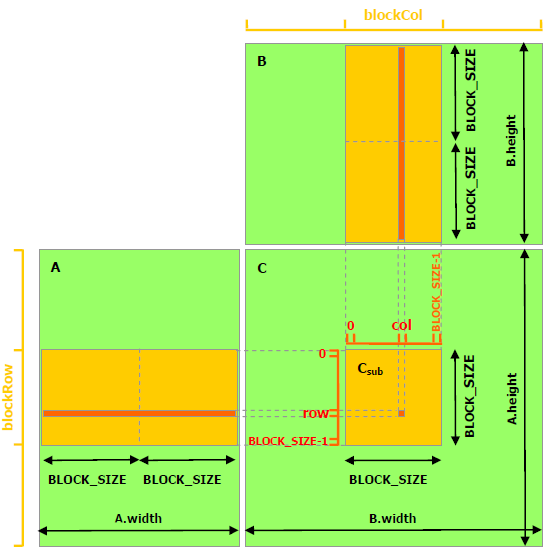
-
- DISTRIBUTED SHARED MEMORY - DSM:
- Introduced in compute capability 9.0 (card RTX H100, CUDA 12.x) while RTX 3080 is just 8.6 with CUDA 11.
- Shared memory of all the participating thread blocks in a cluster.
-
The size of distributed shared memory = numBlocksInCluster x sharedMemoryPerBlock.
-
cluster.sync(): ensures that performance finished in all thread blocks within the cluster. It also ensures that all thread blocks have started executing and they exist concurrently. - New terms:
- what “
const int *__restrict__ input” :__restrict__is very useful to ensure that input ptr will be not allowed to overlap with any other ptr at compile time. so, a thread/worker will feel free and never reload it anymore, then save it in “register” memory of itself and keep using it at higher speed. In short,__restrict__denotes a unique ptr in one kernel.-
  void foo(int *__restrict__ a, int *__restrict__ b)
  int data[10];
  foo(data, data);  // => error because a,b are not allowed to overlap.
-
-
What
"extern __shared__ smem[ ]"? : “extern” keyword denotes/indicates that its size is not fixed at compile time. -
What “histogram”? : given a big collection of numbers within a range (like [0,99]), we use histogram to summerize and compare “appearance frequency” of each number (like 9 appears 100 times, 99 appears 35 times).
- What “bin in histogram”? : bin stands for a range of something ([0,9], eg), each count many data values fall into that bin. For ex, a collection of 0..99, we have 10 parts/nbins, [0,9], [10,19]…[90,99], bin[0]=21, meaning there are 21 items fall into range [0,9]. Then:
- If we have a collection input [11,21,31,41,51,51,51,61,71,81,91,99].
- Histogram will summerize finally, bins = [0,1,1,1,1,3,1,1,1,2].
- What
"for (int i = threadIdx.x; i < bins_per_block; i += blockDim.x){...}"?:-
At first, we get the context: number of bins is very large, so each block can be multiple-bin in a cluster.
-
bins_per_block = number of histogram bins assigned to this block Why i += blockDim.x? Because there are more bins than threads. Let’s visualize: blockDim.x = 4 => 4 threads per block bins_per_block => 12 (12 histogram bins in shared memory each block) Now each thread starts at its own threadIdx.x and adds blockDim.x each time: threadIdx.x = 0 will handle bins 0, 4, 8 threadIdx.x = 1 will handle bins 1, 5, 9 threadIdx.x = 2 will handle bins 2, 6, 10 threadIdx.x = 3 will handle bins 3, 7, 11 So together, all threads initialize bins [0..11] — with no overlap, fully parallelized -
We logically see that the loop will iterate along one block on X-asix, distributing all bins to all threads within a block. But, actually, these computations happens independently in all blocks, more CUDA-typically, it happens in parallel each threads across all the blocks despite “for” loop normally means a seqence in C++. We can see it clearly in the snippet below that gives same result but does not have any loop inside.
-
  __global__ void init3D(float *A, int width, int height, int depth)
  {
      int x = blockIdx.x * blockDim.x + threadIdx.x;
      int y = blockIdx.y * blockDim.y + threadIdx.y;
      int z = blockIdx.z * blockDim.z + threadIdx.z;

      // index will run through a 3D cube.
      // each area on Z, each line in Y, then each item on X.
      int index = z * (width * height) + y * width + x;

      if (x < width && y < height && z < depth)
          A[index] = 0;
  }
-
- What
for (int i = tid; i < array_size; i += blockDim.x * gridDim.x)?:- First glance indicates that
blockDim.x * gridDim.x= all threads in a grid/kernel, i might jump out of a kernel but NO. But similar to above loop, array_size is very large compared to numThreads, so CUDA will distribute array items for each thread within kernel because: int int tid = cg::this_grid().thread_rank();similar to and better thanint tidX = blockIdx.x * blockDim.x + threadIdx.xbecause tid can be 3D while tidX is only 1D for X axis.- Then, with
i = tid, we can run all threads on all dimensions (X,Y,Z) within the grid and in parallel.
- First glance indicates that
- what “
- How to initialize a cluster:
- First, we need a namespace ‘cooperative_group’.
-
  namespace cg = cooperative_groups;

  // similart to int tid = blockIdx.x * blockDim.x + threadIdx.x;
  // but in a cluster of namespace "cg".
  int tid = cg::this_grid().thread_rank();

  // Cluster initialization, size and calculating local bin offsets.
  cg::cluster_group cluster = cg::this_cluster();
  //like "blockIdx" but in cluster
  unsigned int clusterBlockRank = cluster.block_rank();
  int cluster_size = cluster.dim_blocks().x;
  // => just for learning, no use in this kernel snippet.

  for (int i = threadIdx.x; i < bins_per_block; i += blockDim.x)
  {
      // Initialize shared memory histogram to zeros
      // Note, all blocks in the grid will run this code, not one block.
      smem[i] = 0;
  }
- Why “cluster” ? What “a cluster size” ? :
- We have the kernel:
-
  clusterHist_kernel(
      int *bins,                      // ptr to hold result
      const int nbins,                // numBins
      const int bins_per_block,
      const int *__restrict__ input,  // data here
      size_t array_size               // data_length
  )
-
- Easily we need cluster because the limit of shared memory each block. For large data, number of bins is enormous. For example, block shared memory L1 is 99KB.
- Each bin index refers to a unique ptr holding a sizeof(int) ~ 4 bytes = 4B.
- So, if bins_per_block = 1000, then each block shared memory must greater than 100,000 * 4B = 400KB which is greater than 99KB, that’s why we need a cluster. For this case, cluster_size is 5 blocks at minimum, so distributed shared memory will be 5 * 99 = 495KB.
- Now, in one cluster, threads will run in parallel and write results on the DSM for each bin. If threads run asynchronously, we have to make sure their updating is safe by using command “atomicAdd(ptr, n)” that will ensure the addition happens safely and atomically (one after another). This helps preventing “
race conditions”, only threads writing at different memory addresses can run in parallel.
-
for (int i = tid; i < array_size; i += blockDim.x * gridDim.x) { int ldata = input[i]; // one value from histogram data. //Find the right histogram bin. //This ways distribution is different from using (binid % nbins). int binid = ldata; if (ldata < 0) binid = 0; else if (ldata >= nbins) binid = nbins - 1; // Find destination block (block_rank/id) in one cluster // This distribution gives a FIXED couple of block and bin int dst_block_rank = (int)(binid / bins_per_block); // offset for computing to the right memory address // on a block or on DSM histogram int dst_offset = binid % bins_per_block; // DSM pointer to target block shared memory // actually, all smem[i] is 0 initially. int *dst_smem = cluster.map_shared_rank(smem, dst_block_rank); //Perform atomic update of one histogram bin in a block atomicAdd(dst_smem + dst_offset, 1); } - Description: we assume that cluster_size = 2 blocks and
nbins = 20, so each block will handle 10binsusing smem as an array of 10 items, now the smem size is fixed with 10 at runtime. These 10 items on block shared memory but updated through ptrdst_smemon cluster DSM. The updating is handled with atomicAdd() anddata_offsetis the array index onsmem.
- We have the kernel:
-
What
clusters parallelism? : now, after fisnishing all clusters running withcluster.sync(), each cluster will have a different bin[i] allocated on smem[i] on its DSM because clusters run in parallel. Each cluster DSM is independent, we need to combine all smem[i] together across clusters DSM to get the exact bin[i]:-
  // indexing on bins, an array pointer contains all bins.
  // similar = clusterIdx * blockIdx * bins_per_block
  int bin_offset = cluster.block_rank() * bins_per_block;

  // "bins" and "lbins" are on GLOBAL MEMORY.
  int *lbins = bins + bin_offset;
  for (int i = threadIdx.x; i < bins_per_block; i += blockDim.x)
  {
      // this loop will run all the blocks, cluster by cluster
      // not only one block like its appearance.
      atomicAdd(&lbins[i], smem[i]);
  }

  // Finally, bins[i] is updated by accumulating all smem[i]s across clusters.
  // Again, we can see indexing in CUDA is different and auto.

  // A way to make it more easily to get the idea of CUDA indexing.
  // This below loop is similar to the loop above. it's just conceptual, not
  // a real snippet.

  for (int cluster_id = 0; cluster_id < total_clusters; ++cluster_id)
  {
      // Inside each cluster: multiple blocks run concurrently
      for (int block_rank = 0; block_rank < cluster_size; ++block_rank)
      {
          // Each block in the cluster executes this kernel code independently
          // Each block has its own smem[] and thread group

          int *lbins = bins + block_rank * bins_per_block;

          // Each thread in the block processes part of its smem[] data
          for (int i = threadIdx.x; i < bins_per_block; i += blockDim.x)
          {
              // Atomically accumulate shared histogram data to global bins
              atomicAdd(&lbins[i], smem[i]);
          }
      }
  }
-
- 2 NEW THINGS new in CUDA 12+ that older CUDA versions do not have:
-
1>
CUDA_CHECK(::cudaFuncSetAttribute()): set maximum of dynamic DSM greater than default: meaning default DSM is 46KB, we can set higher (like 64KB) temporarily at runtime for a specific kernel, but only when hardware supports because it frankly “steal” from L1 cache. -
cudaLaunchConfig_t config = {0}; config.gridDim = array_size / threads_per_block; config.blockDim = threads_per_block; // cluster_size depends on the histogram size. // ( cluster_size == 1 ) implies no dynamic DSM, just block shared memory int cluster_size = 2; // an example here int nbins_per_block = nbins / cluster_size; //dynamic distributed shared memory (DDSM) size is per block. //DDSM size = cluster_size * nbins_per_block * sizeof(int) config.dynamicSmemBytes = nbins_per_block * sizeof(int); CUDA_CHECK( ::cudaFuncSetAttribute( (void *)clusterHist_kernel, cudaFuncAttributeMaxDynamicSharedMemorySize, config.dynamicSmemBytes ) ); ...continue below... -
2>
cudaLaunchKernelEx(&config, kernelFunc, kernel_args): it is better alternative tokernelFunc<<<>>>(kernel_args)because it can be dynamic withconfigwhile<<<>>>cannot. Also,<<<>>>cannot use cluster since CC9+/CUDA12+. So,<<<>>>is outdated/deprecated since CUDA12+. -
  ...continue from above
  cudaLaunchAttribute attribute[1];
  attribute[0].id = cudaLaunchAttributeClusterDimension;
  attribute[0].val.clusterDim.x = cluster_size;
  attribute[0].val.clusterDim.y = 1;
  attribute[0].val.clusterDim.z = 1;

  config.numAttrs = 1;
  config.attrs = attribute;

  cudaLaunchKernelEx(&config, clusterHist_kernel, bins, nbins, nbins_per_block, input, array_size);
-
-
PAGED-LOCK HOST MEMORY:
- It is also called
host-pinned block memory. -
GPU cannot access host memory directly by default, it needs to copy host data to a staging buffer before performing DMA (direct memory access). So,
page-locked host memorycan help us eliminate this intermediate step by usingcudaMallocHost() or cudaHostAlloc()to define some host memory that can be performed DMA by device. DMA means now CPU is now freed from this copying, DMA engine will handle it to move/copy data to GPU memory withcudaMemcpy()in a much faster way. As usual, after finishing, we should free it withcudaFreeHost()orcudaHostUnregister(). -
float *h_data; cudaMallocHost(&h_data, size_in_bytes); // OR better with cudaHostAlloc((void**)&h_data, size_in_bytes, cudaHostAllocDefault); // after using, free it as normal. cudaFreeHost(h_data); - Some time, when we have a host data already, not nullptr, if we want to let kernel to make it page-locked host memory, we use
cudaHostRegister()that is more complex and not safe because some main OS does not support. -
  float *h_data = (float*)malloc(size);
  cudaHostRegister(h_data, size, cudaHostRegisterDefault);

  // after using
  cudaHostUnregister(h_data);
  free(h_data);
-
Portable memory: when we have 2 devices, to make a block of
page-locked host memoryavailable to all devices, the block needs to be allocated by passing the flagcudaHostAllocPortabletocudaHostAlloc()or page-locked by passing the flagcudaHostRegisterPortabletocudaHostRegister(). -
Write-Combining Memory: another type of
paged-lock host memorywith the flagcudaHostAllocWriteCombined. It is optimized for:-
High write bandwidth from host to device: CPU will not cache this WC data like normal, it writes in packs of data larger than normal in the buffer (host L1 or L2 buffer) and push them to device memory. Hence, WC memory is faster than normal
paged-lock host memory. WC memory is not snooped/interfered during transfers across the PCI Express bus, which can improve transfer performance by up to 40%. -
Terrible CPU read performance: so write-combining memory should in general be used for memory that the host only writes to.
-
NOTE: Using CPU atomic instructions (
atomicAdd, atomicSub, lock xadd) on WC memory should not be guaranteed. (An atomic operation is a thread-safe, indivisible read–modify–write action that prevents data races in parallel code.)
-
- Mapped Memory: Make host memory become device memory by adding flag
cudaHostAllocMappedtocudaHostAlloc()or passing flagcudaHostRegisterMappedtocudaHostRegister().- Blocks in this case will have 2 addresses:
- One in host: return by cudaHostAlloc() or malloc().
- One in device: retrieve by
cudaHostGetDevicePointer()that will fail if GPU itself not support this feature or we forget to initialize GPU withcudaSetDeviceFlags().
- Although the bandwidth is not as good as kernel memory, but it still has some advantages:
- Data transfers are implicitly performed as needed by the kernel. No need to transfer data between host and device anymore.
- One device ptr can also points to a host-pinned block of data, meaning no need to use
cudaMemcpyAsync()to copy data from host to device.
read-after-writeorwrite-after-readHAZARDS of mapped memory: Both CPU and GPU can access the samemapped memory, it is convenient butrace conditionis risky because CPU and GPU can work asynchronously, CPU reads and GPU writes, how to be sure whowinsin thisrace condition. Solutions:-
- Use a stream with
cudaStreamSynchronize(): use stream to make host to wait:
- Use a stream with
-
  myKernel<<<grid, block, 0, stream>>>(d_data);
  // myKernel will be done before host touches memory.
  cudaStreamSynchronize(stream);
-
- Use an event with
cudaEventSynchronize():
- Use an event with
-
  cudaEvent_t done;
  cudaEventCreate(&done);
  myKernel<<<grid, block>>>(d_data);
  cudaEventRecord(done);
  cudaEventSynchronize(done);     // Host waits until GPU done
-
- Synchronize device with
cudaDeviceSynchronize():
- Synchronize device with
-
  myKernel<<<grid, block>>>(d_data);
  cudaDeviceSynchronize();
  // Since here, host waits until kernel GPU done
-
- We can also make GPU to wait for CPU with
cudaStreamWaitValue32(). (detailed in real case).
- We can also make GPU to wait for CPU with
-
-
INITIALIZATION RULE:
cudaSetDeviceFlags(cudaDeviceMapHost);is a MUST ticket granted for GPU to access host memory, then we can map host memory to device through PCIe bus. Wihout it, GPU cannot interfere any host memory, meaningcudaHostAlloc(..., cudaHostAllocMapped)orcudaHostGetDevicePointer()will failed. - Check GPU supports page-lock host memory or not with
cudaGetDeviceProperties():-
  int dev = 0;
  cudaDeviceProp prop;
  cudaGetDeviceProperties(&prop, dev);

  // if prop.canMapHostMemory is 1, GPU supports page-lock host memory.
  if (prop.canMapHostMemory) {}
  else {}
-
Page-lock host memoryVSatomic operations:- PCI bandwidth can be “1-byte, 2-byte, 4-byte, 8-byte, 16-byte” transactions when GPU accesses host memory through PCI bus. It aligns with “char, short, int, double, or float4”, meaning 16 bytes is a max transaction through PCI.
- Atomic operations (like atomicAdd(), atomicCAS()) are supposed to be indivisible — no one else can see the intermediate state. But when apply atomic ops on
mapped host memory, it might not a single transaction anymore as going through PCI bus, it might be divisible by PCI bus despite the result is the same.
- Blocks in this case will have 2 addresses:
- It is also called
-
MEMORY SYNCHRONIZATION DOMAINS :
- NEW TERMS:
- Poll or polling: a CPU operation to keep monitoring a variable that is processed by GPU or other components.
- Spin polling: thread has to wait for another thread.
- Page: a unit of
fixed size block of memory (~4KB)systems keep track of memory at page level, not per physical byte or per variable. Every page has:- A virtual address: what our program sees
- A physical address: where it actually stays (CPU DRAM or GPU VRAM)
- Some status bits: indicates resident, dirty, other infos.
- NOTE: so, when program accesses a variable at
virtual address0x12345678 that is defined by that program, the CPU/GPU finds which page it belongs to, looks it up in thepage table, and translates it to physical memory.
-
Page table: translate
virtual addressesused by your program intophysical addressesused by the actual memory hardware. - Coherence or page coherence (tính mạch lạc, sự liên kết): indicated required co-ordination between the GPU and CPU.
- For example, given x, a variable on Unified Memory, that is visible to both CPU and GPU. Program/System manages x through a page-X, but only one actually stores the latest update of the page-X, assumimg that GPU is storing it in this case. Internally, Unified Memory has to migrate page-X between GPU and CPU depending on who accessed them last:
- GPU accesses x → page-X is available on GPU -> FAST performance.
- CPU accesses x → page-X moves to host memory throuhg PCIe/NVLink -> SLOW
- So, if our app runs with both CPU and GPU touch x one by one, page-X migration becomes a chaos of data moving through PCIe/NVLink.
- For example, given x, a variable on Unified Memory, that is visible to both CPU and GPU. Program/System manages x through a page-X, but only one actually stores the latest update of the page-X, assumimg that GPU is storing it in this case. Internally, Unified Memory has to migrate page-X between GPU and CPU depending on who accessed them last:
- MEMORY FENCE INTERFERENCE: this might degrades kernel performance implicitly because the root cause is from hardware topology/hierachy like:
-
For
unified memoryscope with keyword__managed__ int x;, both CPU and GPU can access x, and if they touch x respectively, a flushing of data will go through PCIe/NVLink due topage coherence, making performance very slow, this is calledinterference. -
FIXING :
- Avoid accessing changes between CPU and GPU too frequently.
- Use cudaMemPrefetchAsync + cudaMemAdvise to control residency.
- Use device memory only, then handle periodic updates to host.
- Using
mapped/pinned host memorymentioned in thepage-lock host memorysection instead ofuinifed memory. Other alternative ways are mentioned later.
-
- ISOLATING TRAFFIC WITH DOMAINS:
- Domain: bigger than cluster, domain starts with
Hopper architectureandCUDA 12.0, independent memory regions they can operate in parallel, one domain can encompass many clusters. What if both domains access the same memory, so we need synchronize/order them withsystem-scope fencingorsystem-scope synchronization:__threadfence()within GPU, all domains are synchronized.__threadfence_system(): within system (CPU + GPU), all domains are synchronized.
- Rule: each
kernel launchis given a domain ID by default. - Hopper has max 4 domains, before Hopper, we may count 1 domain only.
- Domain features:
- Different compute partitions.
- Copy engines.
- GPC groups.
- Distinct clusters under certain configurations.
- Types of domains: 2 major kinds of domains since Hopper.
-
1>
MemSyncDomain: 4 hardware-level ones on Hopper, defining memory ordering and visibility regions within the GPU. -
2>
Logical Domainsorexecute domains: software-level, used by CUDA runtime and driver APIs. Only 2 types of definition so far,Remote and Default:-
Enum Meaning cudaLaunchMemSyncDomainDefaultThe normal domain used by standard kernels.
Standard kernel launch on default engine (e.g.,cudaLaunchKernel()).cudaLaunchMemSyncDomainRemoteAnother logical domain (e.g., secondary engine).
Kernel runs in an alternate execution context (used withcudaLaunchKernelEx()and domain attributes).Cluster domain When kernels use cooperative clusters (cudaLaunchAttrClusterDim).
-
-
- Domain: bigger than cluster, domain starts with
- USING DOMAINS IN CUDA:
-
// launching a kernel with the remote logical domain. cudaLaunchAttribute domainAttr; domainAttr.id = cudaLaunchAttrMemSyncDomain; domainAttr.val = cudaLaunchMemSyncDomainRemote; cudaLaunchConfig_t config; // Fill out other config fields. config.attrs = &domainAttr; config.numAttrs = 1; cudaLaunchKernelEx(&config, myKernel, kernelArg1, kernelArg2...); -
  // mapping different streams to different physical domains,
  // ignoring logical domain settings.
  cudaLaunchAttributeValue mapAttr;
  mapAttr.memSyncDomainMap.default_ = 0;
  mapAttr.memSyncDomainMap.remote = 0;
  cudaStreamSetAttribute(streamA, cudaLaunchAttributeMemSyncDomainMap, &mapAttr);
  mapAttr.memSyncDomainMap.default_ = 1;
  mapAttr.memSyncDomainMap.remote = 1;
  cudaStreamSetAttribute(streamB, cudaLaunchAttributeMemSyncDomainMap, &mapAttr);

  // Now we have 2 domains running in parallel.
  // Hopper only has 4 domains at maximum.

  // === Prepare Launch Config for Kernel A ===
  cudaLaunchConfig_t configA{};
  configA.gridDim  = dim3(4);
  configA.blockDim = dim3(256);
  configA.stream   = streamA;
  configA.numAttrs = 1;

  cudaLaunchAttribute attrA{};
  attrA.id = cudaLaunchAttributeMemSyncDomainMap;
  attrA.val.memSyncDomainMap.default_ = 0;
  attrA.val.memSyncDomainMap.remote   = 0;
  configA.attrs = &attrA;


  cudaLaunchKernelEx(&configA, kernelFuncA, argsA);
  cudaLaunchKernelEx(&configB, kernelFuncB, argsB); //configB is similar.
-
- NEW TERMS:
-
ASYNCHRONOUS CONCURRENT EXECUTION:
- STREAM:
software-levelconcurrent operations. One stream is aqueue/sequenceof commands/kernels (possibly issued by different host threads) that execute in order. Streams exist above clusters, domains, blocks, meaning one stream can contains many kernels, domains, clusters, or blocks.-
  cudaStream_t stream[2];
  for (int i = 0; i < 2; ++i)
      cudaStreamCreate(&stream[i]);

  float* hostPtr;
  cudaMallocHost(&hostPtr, 2 * size);

  for (int i = 0; i < 2; ++i) {
      cudaMemcpyAsync(inputDevPtr + i * size, hostPtr + i * size,
                      size, cudaMemcpyHostToDevice, stream[i]);

      MyKernel <<<100, 512, 0, stream[i]>>>
          (outputDevPtr + i * size, inputDevPtr + i * size, size);

      cudaMemcpyAsync(hostPtr + i * size, outputDevPtr + i * size,
                      size, cudaMemcpyDeviceToHost, stream[i]);
  }

  // Destroy streams
  for (int i = 0; i < 2; ++i)
      cudaStreamDestroy(stream[i]);
-
- Why
stream?:- Queue multiple kernels, copies, and events asynchronously.
- Overlap compute with memory transfers.
- Control dependencies between operations.
- Map work to domains dynamically.
- Allow independent parallelism from the CPU side.
- STREAM:
- NOTE: after “programming interface, open a new topic about warp reduction operations and Independent Thread Scheduling”